Tag: NMEA 2000 setup

  • Best Marine Network Switch & NMEA 2000 Setup Guide

    Best Marine Network Switch & NMEA 2000 Setup Guide

    marine network switch NMEA 2000 setup guide

    Once you have more than one display, sonar source or sensor on a boat, you need a proper network rather than a tangle of point-to-point cables. Here’s how NMEA 2000 networking works in plain terms.

    The backbone concept

    NMEA 2000 runs as a “backbone” — a single cable run with T-connectors branching off to each device — rather than each unit wiring back to a central point individually. This makes adding a new device later far simpler than rewiring everything.

    When you need a network switch

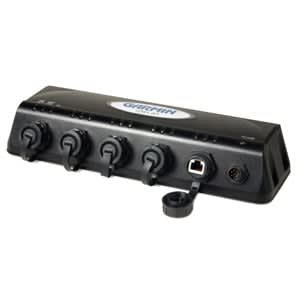
    A device like the Garmin 4-Port Marine Network Switch lets multiple displays share sonar and GPS data from a single source — so a second station display shows the same LiveScope feed as your primary helm, without needing its own transducer. If you’re running two or more displays on one boat, this is what makes shared data actually work.

    Planning ahead

    If you’re only running one display now but might add a second station later, it’s worth running the backbone with spare capacity from day one — much easier than adding a network switch retroactively once everything’s sealed up. Get in touch if you want help planning a multi-display network before you start wiring.

  • How to Install a Fish Finder: Step-by-Step Guide

    How to Install a Fish Finder: Step-by-Step Guide

    how to install a fish finder step by step guide

    Installing a fish finder yourself saves on fitting costs and isn’t as daunting as it looks. Here’s the process broken into clear steps.

    1. Plan the mounting position

    Choose a spot that’s visible from the helm, protected from spray where possible, and has clear access behind the console for cabling. Check swing clearance for any hinged panels or hatches nearby.

    2. Mount the transducer

    Transom-mount transducers need to sit level with the hull bottom, clear of propeller wash and any turbulence sources like strakes or through-hull fittings. Follow the manufacturer’s positioning diagram closely — a poorly placed transducer is the most common cause of noisy or unreliable readings.

    3. Run and secure the cabling

    Keep transducer and power cables away from other electrical wiring where possible to reduce interference, and secure every few inches to prevent chafe. Leave a small service loop at both ends.

    4. Power and network connection

    Wire power through a dedicated fuse, and if you’re networking multiple devices, a marine network switch keeps everything talking cleanly on one NMEA 2000 backbone rather than daisy-chaining devices.

    5. Test before you seal anything up

    Power on and confirm sonar returns and GPS lock before finishing any panel work or sealant — much easier to fix a placement issue now than after everything’s buttoned up. Not confident doing it yourself? get in touch and we can talk you through your specific setup.